Chart of Accounts
Purpose
A chart of accounts (COA) is a list of all the accounts in a company's general ledger (GL). It's a financial tool that provides a summary of a company's financial transactions and the nature of its business. The Chart of Accounts does not show any values.
Chart of Accounts Report
Location
The chart of accounts is located under the Financial Tab in COSTAR, in the G/L Reports Section.
The only option available in this report is whether to Include Inactive Accounts or not.
GL Reporting Structures
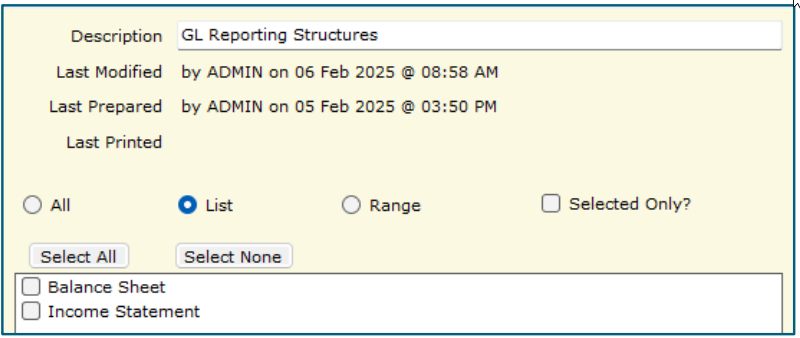
The G/L Reporting Structures report shows the General Ledger codes and their names that are rolled up into each of the headings. This can be useful if tracking down the rolled up values in a financial report.
Location
The G/L Reporting Structures report is located under the Financial Tab in COSTAR, in the G/L Reports section.
Selections
The report can be made to show either the GL Structures for the Balance Sheet, The Income statement (P&L) or both in one report.
Related Articles
Accounts Payable (AP) Cheque Preparation
AP Cheque Prep is used to reconcile and pay Suppliers by EFT, Credit Card or Cheque. This process will produce remittance advices that can optionally be automatically emailed to suppliers paid via EFT (contact the Support Desk to set this up). If no ...Accounts Payable (AP) Invoices and Credit Notes
AP (Accounts Payable) Invoice Entry is used to enter any non stock Invoices or Credit Notes that need to be entered against supplier accounts in Costar. Note: All invoices for stock must be processed in Purchasing, Purchase Orders. All Credit Notes ...Accounts Payable - Invoices and Credit Notes
AP (Accounts Payable) Invoice Entry is used to enter any non-stock related Invoices or Credit Notes that need to be entered against supplier accounts in COSTAR. Note: All invoices for stock must be processed in Purchasing, Purchase Orders. All Credit ...Processing Fleet Credit Notes in COSTAR
This document outlines the general procedure used to process Adjustment Notes received for Manufacturer Credits (such as CDD, B106, DANs etc.). In the Suppliers menu; 1. Select AP Invoice Entry. 2. Click New. 3. Enter the Supplied ...Processing Checklist
This help file outlines the suggested processing that should be completed on a daily, weekly and monthly basis. It is intended that you use this checklist to start with and build on it to create you own for your own business. Daily: Process Sales ...