Day End Cash Variances
Purpose
This help file will guide you through the steps in resolving a banking cash variance after Day End has been run.
These variances are caused when there is a difference between the Total Cash taken in COSTAR and the Net Cash entered as part of the Day End process.
What causes a cash variance?
After Day End has been run, the Cash Reconciliation Report shows the total value of sales that have been processed in COSTAR. Total cash is the sum of all Repair Orders, Paid Outs, Cash Back, Credit Notes etc, that have been sold using the cash tender method as well as any float adjustments processed as a result.
After verifying the amount of cash in the till (less the existing cash float) is the same amount as the value of Total Cash that has been processed in COSTAR, this value should be put in Net Cash to Bank. Adding the Net Cash to Bank will reduce the amount in Variance. Enter the Total Cash counted into the Net Cash to Bank field. The variance should be $0.
If there are any discrepancies between the amount of cash taken in COSTAR and the value put in Net Cash to Bank, this will create a variance.
For example,
- $1248 Net Cash to Bank
- $1268 Total Cash in COSTAR
will create a $20 variance.
Investigating Variances
1. Select Print Cash Rec. If there is a variance, there will be a cash variance notification.
2. If reconciling is complete, select Yes and the batch will be posted. If reconciling is not complete, select No and you will be taken back to the Cash Reconciliation screen to complete the reconciliation.
After selecting Yes, the Cash Rec Report will print to the screen. The value of the cash that is put in the Net Cash to Bank will immediately go onto the Bank Reconciliation.
Note: After the Day End has been run, the total cash taken cannot be amended for that Day End batch.
Confirm the discrepancy is in Cash Variances
1. select Financials from the main menu
2. select G/L Maintenance
3. click the magnifying glass to search for cash discrepancies
1. type in the name of the G/L
2. select Search
3. double Click on the G/L
This will show all the activity for the G/L.
1. click on a month to highlight it
2. click Show Details to bring up that month's activity
This will show the batches and their contents that have been created against this G/L in the selected period.

You will not see the variance until at least one additional day end has been completed. This is because the system creates and posts a variance journal automatically into the next Day End Accting Batch, which is not finalised until the next Day End is completed.
After confirming that the variance is in Cash Discrepancies, a journal can be done within the Bank Reconciliation to move the money out of the cash discrepancies G/L, and onto the Bank Rec.
Journalling the Cash Discrepancies on the Bank Rec
1. go into Financials and select Bank Reconciliation
2. select Create Journal Entry
3. change the accounting period to the relevant period
4. select Put funds into the bank
5. add the amount
6. add a description
7. select Next when done
This will now open the Journal Entry Window.
1. Change the date to the date of the variance
2. Insert the positive value going back into your bank account GL
3. On the second line, allocate your negative figure to your Cash Discrepancies GL
4. Select back
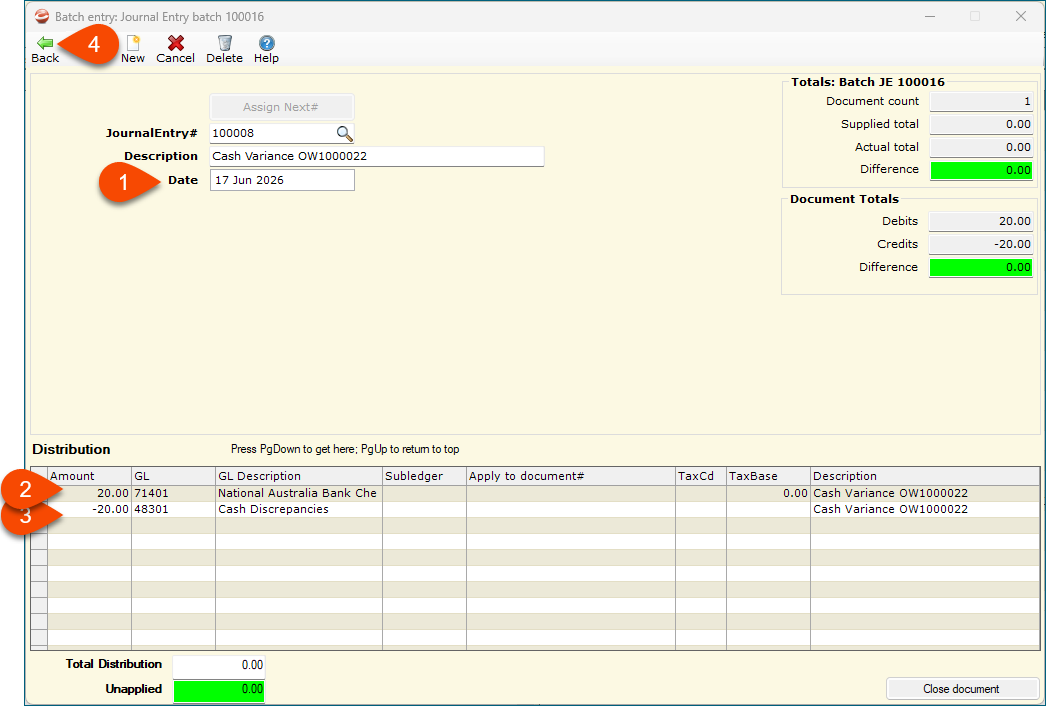
The journal will now be in the Bank Reconciliation. Once selected along with the original Daily Banking batch, the bank will now balance with that day's reconciliation.
Related Articles
Month End in COSTAR
Running the Month End in COSTAR is a simple process. After your normal Day End process on the last trading day of the month, the Month End process will need to be completed to ensure your documents and sales are captured into the correct period. Step ...End of Financial Year Checklist
Purpose To assist in the smooth and efficient transition from one financial year to the next, there are a number of sequential steps to take on the last day of the financial year, as well as reports to run. You will be familiar with most of these, as ...Day End & Monthend Procedure for Costar Express
Purpose This help file will guide you through the steps in processing a Day End and Monthend for a COSTAR Express system. It is advisable to process the Day End each day so that you can balance your cash, cheques and EFTPOS to what has been processed ...Day End & Monthend Procedure for COSTAR Standard
Purpose This help file will guide you through the steps in processing a Day End and Monthend in Costar for a COSTAR Express system. It is advisable to process the Day End each day so that you can balance your cash, cheques and EFTPOS to what has been ...Recreating the Daily Banking Icon
Purpose This help file outlines how to recreate the Daily Banking report icon within your Day End Cash Reconciliation reports. The Daily Banking report allows users to review what sales have been tendered since the last Day End was performed. If you ...