Customer History
Purpose
There will be times when you want to search on the history of a particular customer in COSTAR.
What is described below are a few of the ways to find this information.
Please note: The data
used in the images is only test data and not reflective of what the actual costs and prices may be.
From Document History
Open COSTAR and Select:
- Sales Reporting
- Document History
- Search for the Customer using the filters (Customer name, Phone #, registration etc)
- Review the results for all Order Entry documents.
This allows you to view the Customer History by document. The results can be sorted on each of the
column’s headers by clicking on that column.
You can see the details of each document by double clicking in it.
From a Repair Order
Sometimes you may wish to review previous sales to a customer when you are already in a new
Repair Order. This also allows you to copy items and services from those previous documents to the
current document. From the open Repair Order, select the drop-down arrow beside the History button in the top
toolbar.
This will give you a number of options to search the customer and vehicle combination history.
- Receivables lists any previous sales that are currently outstanding.
- Purchases by item with the retail, last price and cost.
- Document History opens the latest document and allows you to scroll through each using
the Previous/Next buttons in the top toolbar. (Back takes you back to the new document)
- Document Search lists all the documents for the customer no matter the vehicle selected in the new
Repair Order.
- Document Details History allows you to search by Item, Description or document # and
returns item details.
When any of the original documents are open you have the ability to select items, services, kits,
packages or memos listed and copy them with the original pricing to the new Repair Order. 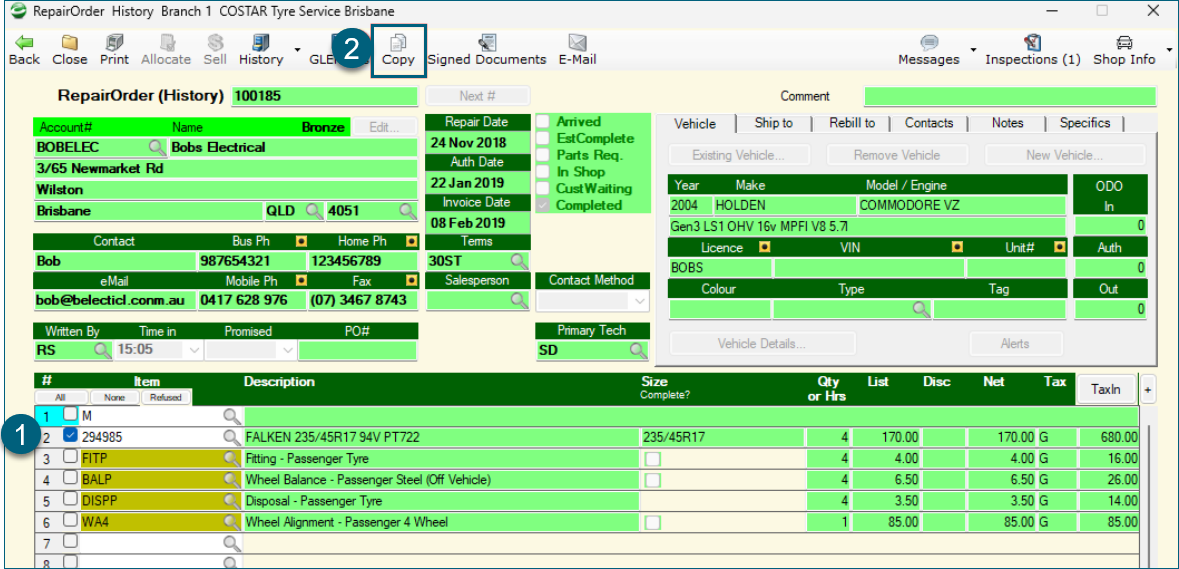
This will return the item to the new Repair Order with a memo for which Repair Order it came from.
Related Articles
Customer Collections
Purpose This function is used to identify and manage overdue Accounts Receivable customer accounts and invoices. Customers with a Credit Balance will NOT show up in this Collection function. In a multi-branch environment, there is an option that ...Customer Recurring Invoices
Purpose This document outlines the process of creating Recurring Invoice Templates for AR Customers in COSTAR. The Recurring Invoice function eliminates the need to manually create the same Invoices, for the same charges, for Customers on a regular ...Customer Sales Report
Purpose Following is a description of some of the Customer Sales reports. These will help you manage marketing and sales campaigns. Customer Sales This report will show customer sales in a user specified date range or an inventory period. In COSTAR ...Marking a Repair Order as Completed
Repair Orders and Invoices have a checkbox that allows your technician to mark a job as Completed. If the work on a Repair Order is completed (i.e. just waiting for the customer to pick up the vehicle), clicking the "Completed" box changes a status ...Order Entry - Payments
Purpose This document outlines how to process a customer payment via the Order Entry menu in COSTAR where a tender method needs to be applied to the payment. Payment Document Used to record payments on Account at point-of-sale. Allows the cash/EFT ...